Getting Ready For Transport Security Layer (TLS) 1.2

GETTING READY FOR TLS 1.2

Payment Card Industry Data Security Standards (PCI DSS) require all PA-DSS validated payment applications to discontinue the use of “early TLS” (i.e., all versions of SSL and TLS 1.0) by June 30th, 2018.

To comply with this requirement, NCR Secure Pay will no longer accept early TLS connections after 2:30 A.M. on June 5th, 2018. In addition, updates to NCR Counterpoint V8.5.4 and V8.4.6 that will require the use of TLS 1.2 for payment transactions processed through NCR Secure Pay will be released as follows:

  • V8.5.4 Patch 002: Scheduled for 2/20/2018
  • V8.4.6.19 Service Pack: Scheduled for 3/6/2018

We do not plan to release patches or Service Packs to support TLS 1.2 in other versions of NCR Counterpoint. To prepare for the transition to TLS 1.2, you must first ensure that TLS 1.2 is supported and enabled on your

workstations by following the appropriate steps for your operating system, as outlined below.

 Do NOT disable early TLS on your workstations, as NCR Counterpoint Services (CPServices) requires TLS 1.0 for internal communications. Because PCI DSS prohibits the use of early TLS for the external communication of payment transactions only, using TLS 1.0 with CPService does not violate PCI-DSS compliance.

CPServices will be updated to use TLS 1.2 in a future NCR Counterpoint release.

Once TLS 1.2 is enabled, you can install V8.5.4 Patch 002 or the V8.4.6.19 Service Pack—depending on which version of NCR Counterpoint you are using—to begin using TLS 1.2 for all communications with NCR Secure Pay.

  V8.5.4 Patch 002 and the V8.4.6.19 Service Pack will only work with TLS 1.2. If you install these updates on a workstation for which TLS 1.2 is not supported and enabled, NCR Counterpoint will be unable to connect to NCR Secure Pay and you will be unable to process payments.

W I N D O WS 8. 1/ W I N D O W S 1 0 / W I N D O W S  S E R V E R 2 01 2 R 2

By default, TLS 1.2 is supported and enabled in Windows 8.1, Windows 10, and Windows Server 2012 R2. Thus,

no additional configuration is required to use TLS 1.2 with these operating systems.

W I N D O S 7/ W I N D O W S  E M B E D D E D  P O S  R EA D Y  7 / W I N D O W S  S E R V E R  2 0 0 8 R 2

If your NCR Counterpoint workstations are running Windows 7, Windows Embedded POSReady 7, or Windows

Server 2008 R2, first ensure that you have installed all current Service Packs, updates, and security patches.

To enable TLS 1.2, create the registry setting entries (in the Client subkey) that are specified in the TLS 1.2

section of the Transport Security Layer (TLS) registry settings page in the Microsoft documentation library

(https://docs.microsoft.com/en-us/windows-server/security/tls/tls-registry-settings#tls-12).

Every effort has been made to ensure the accuracy of this document. NCR makes no representations or warranties with respect to any of the information contained in this document and specifically disclaims any express or implied warranties of merchantability or fitness for a particular purpose with respect to such information. NCR shall not be liable for any errors or for incidental, indirect or consequential damages in connecting with the furnishing, performance or use of this document.

V E R I FY I N G  T H A T  T L S 1 .2  I S  E N A B L E D

If you are using Windows 7, Windows Embedded POSReady 7, or Windows Server 2008 R2, you can verify whether TLS 1.2 is supported and enabled on each of your NCR Counterpoint workstations by using Microsoft Internet Explorer to access the How’s My SSL? Website (https://howsmyssl.com).

Only use Internet Explorer to verify that your workstation is using TLS 1.2; other browsers do not use the Windows TLS system and may display incorrect results.

The Version section of the page should indicate that your client is using TLS 1.2, as illustrated below.

W I N D O W S  E M B E D D E D  P O S  R E A D Y  2 0 0 9

NCR does not currently plan to test or support TLS 1.2 with Windows Embedded POSReady 2009. Although Microsoft has indicated that an update will be made available to support TLS 1.2 with Windows POSReady 2009 (https://cloudblogs.microsoft.com/microsoftsecure/2017/10/05/announcing-support-for-tls-1-1-and-tls-1-2-in- xp-posready-2009/), merchants who wish to continue using POSReady 2009 must do so at their own risk.

We strongly recommend upgrading any workstation that is running Windows POSReady 2009 to a newer, supported operating system.

Marilyn.

Benefits of NCR Secure Pay

Benefits of NCR Secure Pay

Without P2PE Hardware

NCR Secure Pay offers added security even when it is employed without Point-to-Point Encrypting (P2PE) Hardware.

Tokenization
The way card information is stored in your retail location is a key component of security. You need to ensure that you are storing cardholder information securely at all locations in your retail environment.

NCR Secure Pay utilizes tokenization, which is the most secure method of credit card data storage, also known as a token replacement. Tokenization allows NCR Counterpoint to store a token instead of an actual card number. If your system were breached, unauthorized users would only find the token information and not the actual card information, which is stored in a token vault hosted by NCR. With
the token, you can access the transaction information as needed for returns and other operations, including a card on file billing, while maintaining a secure system.

Host-Based Settlement
NCR Secure Pay uses host-based settlement, which stores transaction information at NCR’s host, rather than your NCR Counterpoint installation, until settlement. This provides flexibility allowing a settlement to be easily automated from the host or initiated from any web browser by using the NCR Secure Pay merchant portal.

In addition, with a host-based settlement, POS workstations running in “offline” mode can are still able to settle their transactions. This is a great benefit when offline workstations are disconnected for an extended period, such as during large upgrades.

With P2PE Hardware

Point-to-Point Encryption
Transmission of cardholder data between your system and the payment processor can be an area of a weakness that cyber payment criminals target.

To get an approval from a credit processor, card information must travel from the MSR (card reader) through the Point of Sale (POS) application and operating system (OS) to an application which communicates with the credit processor in order to get an authorization. Most systems pass the card data from the MSR unencrypted through the OS to the POS application and encrypt before sending the
approval communication to the credit processor.

With the addition of P2PE Hardware, NCR Secure Pay enables you to encrypt directly by the MSR hardware at the time the card is swiped, rather than solely during the transmission to the credit processor. The encryption happens in the hardware on the MSR device, not inside your NCR Counterpoint system and unencrypted data never exists on your POS network. This ensures sensitive cardholder information is encrypted throughout its lifecycle in your environment, limiting your risk of an unauthorized user scraping that data from memory.
Benefits of NCR Secure Pay

Another difference worth noting with P2PE as compared to traditional encryption is that the encryption and decryption processes use different keys. Even if you have the encrypting key, you can’t decrypt the data because the key to unlock the data is not the same. When using P2PE with NCR Secure Pay, the decryption key does not exist in the store environment, again reducing the risk that sensitive data could
be stolen from the system.

Contact CCS Retail Systems to get started with your NCR Secure Pay Systems.

Marilyn.

NOTICE: PCI DSS Requires Transition to Secure Pay Before April 30th, 2018!

PCI DSS Requires Transition to Secure Pay Before April 30th, 2018!

TSYS and WorldPay Ending CPGateway Support

TSYS will discontinue support for the NCR Counterpoint Gateway (CPGateway) platform on April 30th, 2018. Merchants who are currently processing EDC payments through TSYS via CPGateway are advised to migrate to NCR Secure Pay before this date to ensure they can continue processing without interruption.

In addition, Worldpay will discontinue support for CPGateway within a similar time frame (we will announce the actual date on which CPGateway support will end for Worldpay merchants as soon as it is confirmed). Again, we strongly encourage merchants who are currently processing EDC payments through Worldpay via CPGateway to migrate to a Worldpay (TCMP) account for NCR Secure Pay to avoid any interruptions.

TLS (Transaction Level Security) 1.2 Transition

Getting Ready for TLS 1.2 (Check My TLS Status)

Payment Card Industry Data Security Standards (PCI DSS) require all PA-DSS validated payment applications to discontinue the use of “early TLS” (i.e., all versions of SSL and TLS 1.0) by June 30th, 2018.

To comply with this requirement, NCR Secure Pay will no longer accept early TLS connections after 2:30 A.M. on June 5th, 2018. In addition, updates to NCR Counterpoint V8.5.4 and V8.4.6 that will require the use of TLS 1.2 for payment transactions processed through NCR Secure Pay will be released as follows:

  • V8.5.4 Patch 002: Scheduled for 2/20/2018
  • V8.4.6.19 Service Pack: Scheduled for 3/6/2018

NCR does not plan to release patches or Service Packs to support TLS 1.2 in other versions of NCR Counterpoint.

To sign up for an NCR Secure Pay account, Contact CCS Retail Systems  ASAP.

Marilyn.

Using The Passport Payroll and a Time Clock Function

Using The Passport Payroll and a Time Clock Function

Meet TimeClick 2018

Rated the best time clock software by Top Ten Reviews, TimeClick is a simple to use time clock program that allows employees to clock in and out from their computers. It keeps detailed records of all time worked for as long as the user wishes and allows reporting of any time period asked for. TimeClick works with Passport’s PBS Payroll to simplify payroll preparation.

And now, new TimeClick 2018 features a sleek interface that makes it easy for any employee to clock in/out, switch departments or jobs, review messages, view current hours, all on one customizable screen.

Real-time reporting allows instant viewing of employee hours and prevents unwanted overtime by using employee schedules with “early” clock in prevention.

Employees can be assigned to jobs and departments to break down hours worked into different categories and track where time is being expended.

Depending on settings, employees are able to access the Employee Options Menu, which allows employees to send/receive messages, request Vacation, Sick, or PTO off, receive notifications and submit missed time requests. This simple messaging system allows for easy communication!

Contact CCS Retail Systems to explore how a Time Clock can streamline your payroll operations efficiency and accuracy.

Marilyn

CCS Achieves NCR Centurion Club Status

CCS Achieves NCR Centurion Club Status

NCR monitors the performance of its channel partners such as CCS Retail Systems, Inc.  Achieving Centurion Club Staus at CCS helps us maintain the best relationship possible with NCR.  This status ensures we get priority in pricing, discounts, shipping, and support from NCR for our customers.  We wish to thank all of our customers who helped make it possible for us to provide the maximum leverage of NCR resources to pass on to all customers.

“I wanted to congratulate you on meeting the Q4 Centurion Club requirements for 2017.  I also wanted to officially recognize CCS Retail Systems, Inc. and personally take the opportunity to say thank you for putting up a great Q4.

Best,

Jason Skolak
Channel Account Manager – Retail Solutions Division”

Marilyn

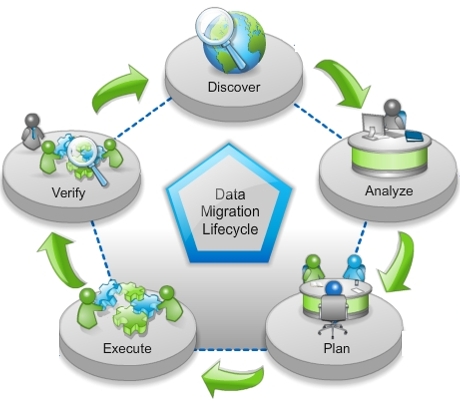
Historical Data Migrations From Old to New Platforms.

Historical Data Migrations From Old to New Platforms.

Data migrations can go awry for many reasons, however, most often these bad situation scenarios can be avoided with consultation with CCS Retail Systems Support and some careful planning.

Here are some recent examples.

  1. Data Migrations where corrupt data is present.

An IT person did an in-house test migration to a newer NCR Counterpoint software version. The company preferred to not purge history regularly. There were some known corrupt data records complicating the procedure. The company had some history that was over 10 years old. (A recommended policy is to try to keep 3 years of history at a maximum.)

The IT person planned to start the upgrade on a Friday night and complete it by the following Monday morning. This approximately 48+ hour time frame would be very aggressive when considering the scope and complexity of the conversion.

  1. Trying to using the current software on antiquated hardware and unsupported antiquated operating systems.

Attempting this sort of migration can be a recipe for disaster because damage to your data could occur from system architecture and software limitations.

For example, a business owner copied his current updated software installation onto an old server running an older, unsupported operating system. The performance of the software was then extremely inadequate for the task. Program completion times were decreased by as much as two orders of magnitude from current systems available.

  1. Some things that you can do to prevent the above-referenced scenarios are:

1. Verify that existing hardware, operating system, and software infrastructure meets or exceeds the minimum requirements for the new software. This should be considered mandatory

2. Get proper training on the new software in advance of doing either a test migration or a live migration.

3. Read all of the documentation related to the entire data migration process.

3. Plan to do a thorough test migration, This would include having end-users replicate normal processing work that represents a least several days’ worth of live data that was done in their old system.

4. Schedule CCS Retail Systems Support to do the entire data migration or provide your organization with assistance on the migration project.

– John

Customizing CPSQL

Customizing CPSQL

I recently had a user ask me to notify NCR that a certain field in the customer table should be added as a search field because of how technology is advancing.

When this Counterpoint user added customers to their system, they were using the customer’s landline phone number as the customer account number.  Fortunately, in Counterpoint besides having a landline phone number field there is a mobile phone number field.

With more people choosing to not have a landline anymore, this user wanted to use the mobile phone number as a lookup field and wanted to give their mobile technicians an easier way to look up their customers when away from the office.

This can be accomplished easily in NCR Counterpoint by adding the mobile phone number field as a “keyword” to be used during lookups. As a matter of fact, just about any field can be set as a keyword field to be used for lookups.  Keywords can also be configured for item lookups, ticket history lookups, and most other table/field combination you need.

If you are not familiar with using some of the more advanced features of NCR Counterpoint, give the CCS Retail Systems Support department a call at 800.672.4806 or email us to help you make lookups more useful for you and your crew.

-Bryan

Year End Closing

Year-End Closing, Inventory Counts, Freezing Inventory, Adjustments, and Posting.

When you need to take stock of your inventory, such as year-end closing, you can depend on Counterpoint physical count features.  You can freeze inventory quantities for specific items, vendors, categories, a single stocking location, or all stocking locations. This flexibility allows you to count only part of your inventory, while normal operations continue in other departments or locations.  

You can enter counts manually—from quantities recorded on printed worksheets—or import them from handheld scanners to streamline the counting process. You can also record up to six count quantities for each item (e.g., from different areas of your store).  Posting physical count transactions automatically adjusts on-hand quantities for items where the frozen quantity and the counted quantity varied. You can skip uncounted items, set their on-hand quantities to zero, or assume their frozen quantities are correct.

You can use the same prompts for all serialized items, or you can associate different prompts with different items. Responses to serial prompts are retained with the transaction detail for each serialized item and are available for viewing and reporting.

For accounting purposes, you have the option of using the serial cost method to track the specific cost of each “always serialized” item, versus the average cost method used for other items.

CCS can help you plan your year-end closing and guide you through the detailed steps of freezing your inventory, counting, and adjusting your quantities.  Contact CCS at CCS Support for assistance.

We also have equipment rentals for special occasions like inventory counting.  Let me know if I can help.

Marilyn

Counterpoint V7 to SQL Yearend Discount Special!

Counterpoint V7 to SQL Yearend Discount Special!


 Happy Holidays

It’s Time to Think About Migrating to Counterpoint SQL!

Considering New Hardware and Windows10 Packaging? Remember CPSQL Supports Windows 10!

Here’s Our CPSQL Upgrade Special for You!

SPECIAL BUNDLE AND PRICING, INCLUDING TWO EXTRA BONUS ITEMS

Limited Time Special of 25% Off the List Price of Counterpoint V7 Upgrades to Counterpoint SQL.
1 Month of FREE Smart Alerts Counterpoint System Monitoring and Alerting to Your Mobile Devices.
1 Month of FREE Customer Connect Integrated Counterpoint Email Marketing.

NCR Smart Alerts is a mobile alerting tool allowing you to keep track of what happens in your store at all times We know the world is a stage, but that doesn’t mean you can be everywhere at once. Like your own personal assistant, our software makes you feel like you’ve got everything covered. Our mobile alerting system informs you of all store operations across your locations, keeping you up-to-date on sales information, any fraudulent activity, or day-to-day operations.

NCR Customer Connect is a powerful integrated email marketing system helping you grow your business by driving sales. The show’s not over yet—get them asking for an encore! Send follow up emails to connect with your customers after their experience. Our integrated, automated email marketing system enables you to use customer data and preferences to send them personalized offers.

More …

Don’t Miss This Limited Time Offer. Special Pricing Ends December 22, 2017.

Call CCS Marilyn at 800/425-672-4806 or Email sales@ccscentral.com

Counterpoint v7 migration to Counterpoint SQL Special

Counterpoint v7 migration to Counterpoint SQL Special

It’s Time to Think About Migrating to Counterpoint SQL!

Considering New Hardware and Windows10 Packaging? Remember CPSQL Supports Windows 10!

Here’s Our CPSQL Upgrade Special for You!

SPECIAL BUNDLE AND PRICING, INCLUDING TWO EXTRA BONUS ITEMS

Limited Time Special of 25% Off the List Price of Counterpoint V7 Migration to Counterpoint SQL.
1 Month of FREE Smart Alerts Counterpoint System Monitoring and Alerting to Your Mobile Devices.
1 Month of FREE Customer Connect Integrated Counterpoint Email Marketing.

Don’t Miss This Limited Time Offer. Special Pricing Ends December 22, 2017.

Call Marilyn at 800/425-672-4806 or Email sales@ccscentral.com